
Which Bullet Force Is This? The 2016 PacoGames Demo Explained
Published · Updated · 3 min read
A sponsored demo, not the multiplayer client
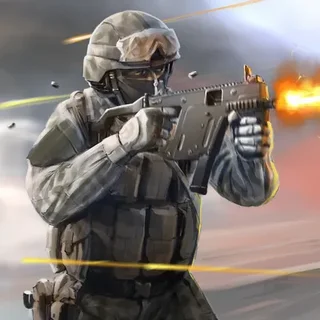
The Bullet Force on this site is a single-player WebGL demo that Blayze Games made with the portal PacoGames. You can see that from the first second: before the menu, a PacoGames splash fills the screen with the line "Game: Bullet Force". Inside the build, the player settings name the company as BlayzeGames, the product as Bullet Force and the version as 1.0. It is not a copy of the online game that grew out of it. There is no lobby, no login and no list of rooms, so nothing in it waits on a match server.
What is inside the build
The game data lists six scenes: a main menu, a "level complete" screen and four mission scenes named Level9, Level3, Level6 and Level2. The first mission, the one Easy mode loads, is a hillside with palm trees, boulders, wooden crates, a wire fence and a round concrete tower. Allied soldiers in green camouflage stand with you when it starts, and the scene files hold a set of spawn points for the enemy side. The level complete screen has four labels: Mission Complete, Continue, Replay Game and Play Full Version. A mission has an end, then, and is not an endless stream of enemies.
Why Normal and Hard do nothing
The menu shows three buttons: Play Easy Mode in white, and Play Normal Mode and Play Hard Mode in pink. Only Easy starts a game. When we pressed the other two and logged the build's outgoing calls, both tried to open the same address, pacogames.com/links/bullet-force.php, the "full version" link of the original 2016 deal. That page now returns a 404 error, and our copy keeps every outbound link on the page anyway. So the pink buttons do nothing here. They were never a harder mode; they were an advert for the full game.
The engine and what it costs your browser
The build was made with Unity 5.2.1 and compiled to asm.js through IL2CPP, the way Unity shipped WebGL games in 2015 and 2016. That explains the heavy first load. The data file is about 70 MB and the engine script about 29 MB, so the first visit fetches roughly 100 MB. The page also reserves a fixed 512 MB block of memory for the game before the menu appears. Older asm.js builds cannot grow or shrink that block. If a browser cannot spare it, the page tells you to close other tabs and reload. The second visit is faster, because the files come from the browser cache.
Phones and touch
The mission scenes do contain on-screen controls: a joystick, a fire button and buttons for switching guns, reloading, crouching and pausing. These are the remains of the mobile version. They did not appear in a desktop browser, and the 512 MB memory block is more than many phones give one tab. A laptop or desktop with a mouse is still the way to play.
Where the full game lives
The full Bullet Force, with online matches, is a separate game from Blayze Games. Its official home is blayzegames.com. This site does not host that version, and copies of the online client on other domains cannot reach its servers. The demo here is the part that still works on its own: one sponsor splash, one Easy button, and a squad-sized firefight in the palms.
More from the blog
- Bullet Force Demo Guide: Easy Mode, Three Weapons and Allies
Hard mode is locked in this demo, so here is Easy as it really plays: three weapons on one key, the ammo counts, your allies and the enemies counter.
- Which Browser Shooters Still Work in 2026: The Ones on This Site and Why the Rest Are Gone
Half the shooters that used to be on this domain were dead links or connecting screens. What survived the check, what the online ones actually connect to, and the two-player picks that need no server at all.